
What a digital rehabilitation room needs: six questions before you invest
When a centre decides to bring technology into rehabilitation, the questions that reach management tend to be practical ones: how much space is needed, whether the room we already have will do, what has to be bought, how you clean a headset between patients, where it all gets stored and whether you can work in groups. This article works through those questions for the technologies most often found in a digital rehabilitation room, from motion capture and virtual reality headsets to tablets, robotics and sensors worn on the patient, and ends with the question worth asking before any of the others: whether the software is a medical device or a video game.
Which technologies go into a digital rehabilitation room
Under the label of "digital rehabilitation" sit five families of technology that behave very differently once you look at the room. Markerless motion capture uses a sensor or a camera in front of the patient and shows the exercises on a large screen, with nothing worn on the person. Virtual reality headsets put the exercise inside the visor and the therapist follows it from outside. Tablets and interactive whiteboards are the usual support for cognitive rehabilitation. Robotics, with gait exoskeletons and upper limb robots, moves or assists the patient's limb. And sensors worn on the body — inertial sensors, instrumented gloves or force plates — measure one segment or one force with considerable precision.
Each family has its own clinical indications, and choosing between them is the clinical team's job. What follows compares only what each one asks of the room, the equipment, the daily routine and the budget, which is what management needs in order to decide where and how a digital rehabilitation room gets installed.
1. How much space do you need?
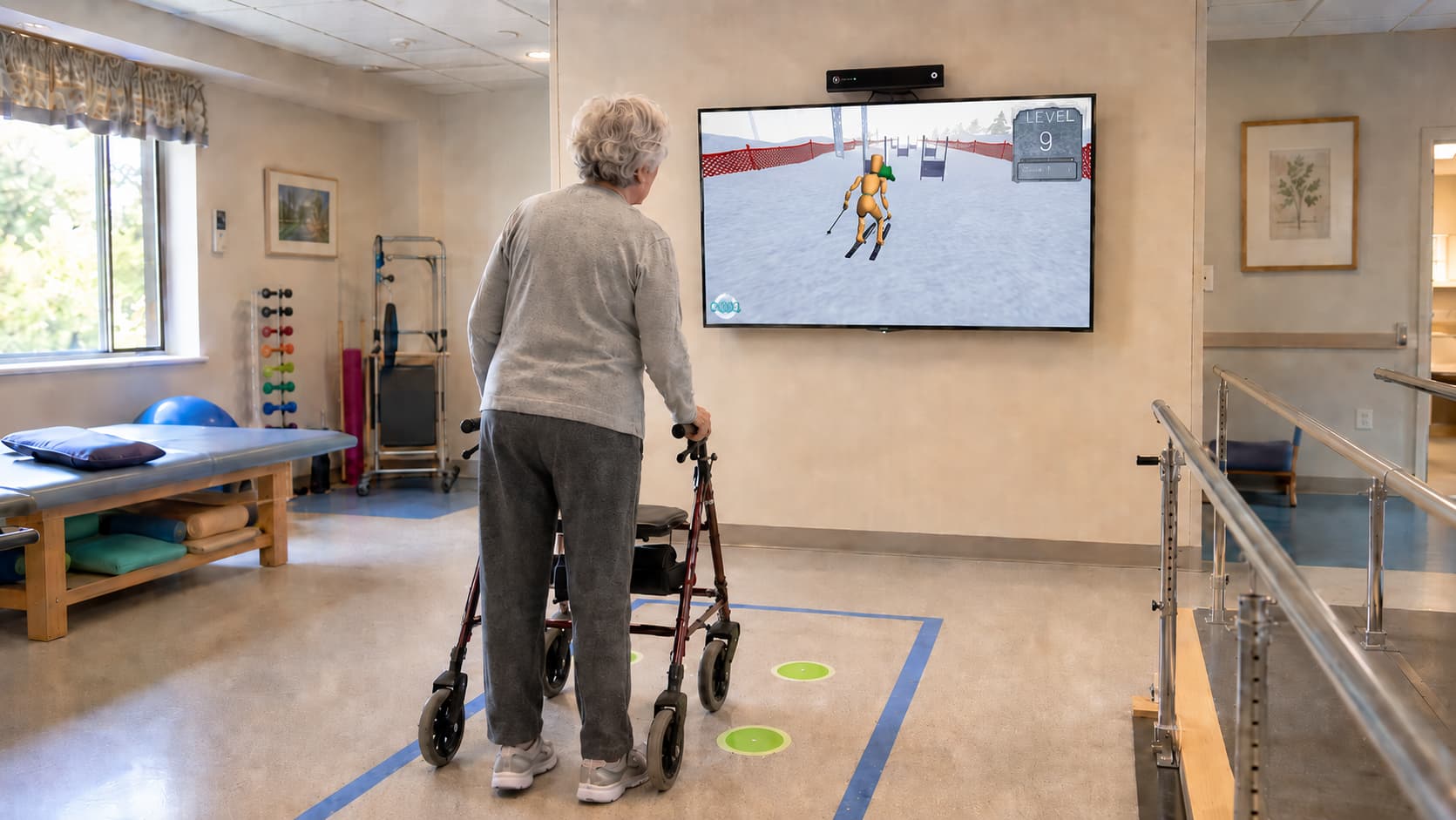
Less than people expect, in almost every case. A motion capture station is organised around one distance: about two metres between the sensor and the person, which is what the sensor needs in order to see the whole body, standing or seated. The sensor sits on a stand or a piece of furniture at a minimum height of one and a half metres, pointing at the chest, with the screen above it or beside it. A strip of about 3 metres deep by 2.5 metres wide, with the screen at one end, is enough, and it fits at the back of any physiotherapy room. Many centres mark the reference position on the floor with tape, so that every session starts in the same place. The patient can work seated, standing, with a walking frame or with a stick, and the therapist stands to one side with their hands free.
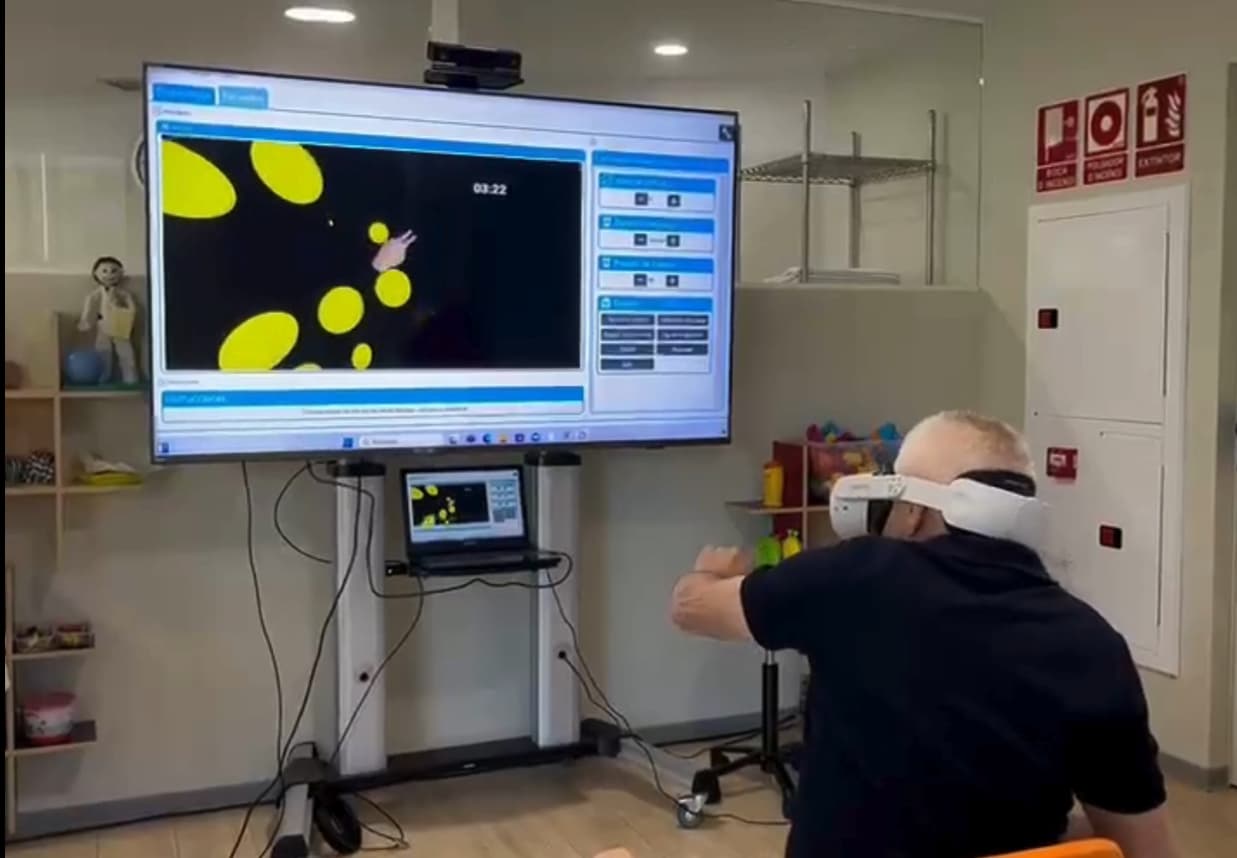
Virtual reality headsets ask for even less. A good part of headset work is done seated or standing without moving around, so the space the session takes up is the person with their arms outstretched, a chair and a margin around them. For activities that involve moving, Meta recommends a clear area of at least 2 by 2 metres, and the visor itself draws a virtual boundary that warns the person if they come close to the edge. Current headsets also let the person see the real room through their cameras, in what is known as mixed reality, which gives reassurance in the first sessions and to anyone with balance problems.
A tablet or an interactive whiteboard needs a table, chairs and an internet connection. At the other end are robotics, which takes a fixed position with its own power socket and, for gait exoskeletons, a corridor or a treadmill, and body-worn sensors, which take up little space but bring their own kit: the sensors, their charging docks, straps in different sizes and somewhere to fit and calibrate them before starting.
2. What do you have to buy and what can you reuse?
This is the biggest difference between families, and the one that weighs most on the budget of a digital rehabilitation room. Motion capture, headsets and tablets run on consumer or low-cost equipment: a computer, a television or a projector, a sensor the size of a soundbar, a headset of the kind sold by any retailer, tablets. A good part of that kit already exists in many centres or can be bought without waiting, and the value of the investment lies in the software and the data it produces, not in the machine. Some providers include the sensor with the software, others specify which model to buy, and some platforms work with nothing more than a webcam.
Robotics and body-worn sensor systems are each manufacturer's own devices, supplied, maintained and replaced by them. The investment is concentrated in one piece of equipment that treats one patient at a time, and increasing capacity means buying another.
A headset station consists of visor, licence and a computer with a mirrored screen, and that is how you work out how many stations fit into the timetable and the budget. On networking, wifi in the room is advisable for controlling the headsets and syncing the data, and a wired network point and a power socket near each station take care of the rest.

3. How do you clean between patients?
Of everything in a digital rehabilitation room, motion capture is the simplest: the patient touches nothing, and the sensor and the screen are cleaned like any other equipment in the room. Tablets are wiped down like any screen. Body-worn sensors and a robot's straps are in contact with every patient and are cleaned piece by piece at the end. Headsets are in contact with the face and the hands, which is why they have a routine of their own, short and well studied.
The evidence is reassuring. A study published in the Journal of Medical Internet Research in 2022 deliberately contaminated porous and non-porous surfaces of Meta Quest and Quest 2 headsets with three types of bacteria and found that both isopropyl alcohol wipes and alcohol-free quaternary ammonium wipes achieved adequate disinfection, better on non-porous surfaces than on porous ones such as the foam of the facial interface. The same paper proposes a standard procedure for healthcare settings and suggests an additional barrier over the porous part.
The routine most centres follow combines three things: replacing the foam facial interface with a silicone or PU one, which does not absorb and wipes clean in seconds; a non-abrasive disinfectant wipe on the interface, the strap and the casing after each patient, as the manufacturer specifies; and a dry microfibre cloth for the lenses. Some centres add disposable face covers when several people use the same headset in a group session.
4. Where do you store and charge it?
Headsets run on battery, with around two hours of continuous use, which with half-hour sessions and breaks in between comfortably covers half a day. To get through a full day you only need a habit: a fixed place where the headsets are left charging whenever they are not in use, with the cable permanently connected, so that putting them on charge is the same gesture as putting them away. Anyone working with two pairs alternates one in use and one on charge. Tablets follow the same logic.
For storage in a digital rehabilitation room, what matters is that it is enclosed, dry and in sight of the team: a cupboard shelf with an extension lead inside, a drawer with the cable run through the back, or the headsets' own case all do the job. The motion capture sensor stays where it is.
5. Can you work with several people at once?
This is the question that comes up most in care homes, day hospitals and large clinics, and the answer depends on the family. Cognitive rehabilitation on tablets lends itself best to group work: several people work at the same time, each with their own tablet and their own difficulty level, while the professional moves from one to another; or the whole group follows the same activity on the interactive whiteboard or a large screen, led by the therapist, which is the usual format in care homes and day centres.
With motion capture there are two routes. Some platforms include group activities in which several people work at once in front of the same sensor and the same screen, designed for collective sessions on balance, coordination and mobility. And if you want several individual stations in the same digital rehabilitation room, each one has its own strip of about two metres' depth, laid out so that each sensor sees only the person working with it; in a long room, two stations on opposite walls work very well, and a line on the floor helps patients position themselves.
With headsets, several people work in the same room without interfering with each other, because each visor is independent. What gets planned is everything else: how many people each professional supervises, a chair and a clear margin for each station, and each visor with its own computer and mirrored screen, positioned so the team can see them all from one spot. Robotics and body-worn sensors work with one person at a time per piece of equipment.
A mixed session combines several families: one or two people on headsets, a small group in the motion capture group activity and the rest on tablets, rotating through the session. The experience of a long-term care hospital published on this blog describes how something similar was organised and lists among the requirements management buy-in, suitable spaces and the team's own involvement.
6. Medical device or video game?
If the sensor, the screen and the headset are the same ones sold for gaming, a reasonable question comes up in management: why not simply use a games console or a commercial exercise app. The difference lies in the software, and it is what justifies the investment in a digital rehabilitation room.
A rehabilitation programme CE marked as a medical device is designed, documented and evaluated for clinical use. Its exercises start from therapeutic objectives, adapt to the performance of people with limitations of mobility, cognition or balance, and let the professional configure every parameter for every patient. A video game is designed to entertain a healthy player: its difficulty rises with the player's skill, its controls assume abilities the patient may not have, and its logic rewards speed and competition.
The second difference is the record. A medical device saves the data from every session — range of motion, repetitions, correct answers, times, level reached — into each patient's record and generates reports the centre can hand to the patient, the referring doctor or whoever funds the treatment. A console saves a score. And the third is accountability: a medical device has a manufacturer answerable for its safety and its performance in the intended use, with a vigilance system and updates, and it handles patient data in line with health data protection law; a video game or a consumer app states in its terms of use that it is not intended for medical purposes.
This blog has covered the question in more detail in Is using video games the same as using a clinical application in rehabilitation? and in Do you use a games console in your rehabilitation sessions?. For the room, the practical conclusion is simple: the hardware can be the same, the software cannot.
How Rehametrics fits in
Rehametrics covers three of the five families with a single platform and a single patient record. Rehametrics Physical is motion capture: a Windows computer, a screen and the sensor, which in Spain is provided with the software, including during the free seven-day trial; outside Spain the technical team advises what to buy, and there is a webcam mode. Its more than 120 exercises, among them group activities for two to four people, record range of motion at the shoulder, elbow, hip and knee, repetitions, speed and, in balance work, centre of gravity and base of support.
Rehametrics VR runs on Meta Quest 2, 3 and 3S, with hand tracking and no controllers. The licence is per headset, each headset is controlled from its own computer with a mirrored screen, and it can be used in mixed reality with the room visible. Its more than 70 activities cover reaching and fine motor skills, activities of daily living, dual-task exercises and cognitive rehabilitation in an immersive environment, and can continue at home with follow-up from the team.
Rehametrics Cognitive runs on tablets and interactive whiteboards, in the clinic or with remote follow-up. Its more than 190 exercises cover attention, memory, working memory, processing speed, language and executive function, with difficulty adjusting to each person's performance, and allow several people to work at once on their own tablets or a group session to be led from the whiteboard. All three modules are medical devices with CE marking and generate progress reports for each patient.
During implementation, the Rehametrics team goes through the room with the centre: where the sensor and screen go, how the headsets are configured, and the cleaning and charging routine, and trains the team. Questions about which room to choose or how to lay out several stations get settled at that stage.
A computer, a screen and a sensor
More than 120 exercises with motion capture, with no controllers or devices on the patient, and group activities for two to four people.
View module →
Meta Quest with no controllers
More than 70 activities with hand tracking, mixed reality and a mirrored screen so the therapist can follow the session from outside.
View module →
A table, a chair and a tablet
More than 190 exercises on tablets or an interactive whiteboard, for one-to-one work, several people at once or a group session led by the therapist.
View module →Frequently asked questions
How many square metres does a motion capture station need?
A clear strip of about 3 metres deep by 2.5 wide, with the screen and the sensor at one end and the patient about two metres from the sensor. It fits at the back of a conventional physiotherapy room.
And for working with virtual reality headsets?
For sessions seated or standing without moving around, the space of a chair with a clear margin around it. For activities involving movement, the manufacturer recommends at least 2 by 2 metres free of obstacles, and the visor itself warns the person if they come close to the edge.
What equipment do you have to buy for a digital rehabilitation room?
For motion capture, headsets and tablets, consumer equipment: a computer, a screen, a sensor or a headset of the kind sold by any retailer. Robotics and body-worn sensors are each manufacturer's own devices. It is worth asking the provider whether the sensor is included and what each station consists of.
How are headsets cleaned between patients?
With a silicone or PU facial interface, a non-abrasive disinfectant wipe on the interface, the strap and the casing after each use, and a dry microfibre cloth for the lenses. A 2022 study found that both isopropyl alcohol wipes and quaternary ammonium wipes adequately disinfect non-porous surfaces. The specific procedure is set by each centre with its infection prevention and control team.
Can you work in groups?
Yes. Tablets allow several people at once or a session led from the whiteboard; some motion capture platforms include group activities in front of the same sensor; and with headsets, each visor is an independent station. Robotics and body-worn sensors treat one person per piece of equipment.
If the hardware is consumer kit, why not use a games console?
Because the difference lies in the software. A CE marked medical device is designed and evaluated for patients, configured by the professional, records every session in the patient's file and has a manufacturer answerable for its safety and for data processing. A video game is designed to entertain a healthy player.
How many headsets does a room need?
One per active station and, if the timetable is busy, one more on charge, because battery life is around two hours of continuous use. Each headset station consists of visor, licence and control computer. A fixed charging spot with the cable always connected keeps the headsets ready all day.
Want to know whether your room will do?
Tell us what space you have and we will tell you what it takes to set up a motion capture station, a headset station or a mixed digital rehabilitation room, and how centres like yours have organised theirs.